How to Stay Updated on Legal Tech as a Lawyer — One Short Email Every Morning
Published July 3, 2026
"Are we using anything like this?" Your partner slides her phone across the table — an AI contract-review tool you've never heard of, and a client asking about it tomorrow.
Good news — you're in the right place! You don't need another subscription to fix this, just one short email. Setup takes about two minutes, and the first edition is free.
In this guide, I'll show you how to stay updated on legal tech with MorningMail — a tool I built where an AI agent researches fresh sources every morning and writes the brief itself: court rulings, bar guidance, the tools that actually matter.
Let's dive in.
What you'll build
Legal-tech newsletters write for an imagined average reader — usually a BigLaw innovation team. If you run a five-lawyer litigation boutique, most of that is noise. With your own prompt you state your practice area, jurisdiction and firm size once, and every edition is filtered through that lens.
A keyword alert won't do this job either. Google Alerts forwards every page that mentions "legal AI" — mostly marketing. MorningMail's agent searches fresh sources each morning, tells an actual court ruling from a vendor announcement, and writes you a short memo — the docket or guidance document linked directly, so you can pull the source yourself.
That citation habit matters more in law than anywhere else. You'd never rely on an unsourced summary in front of a judge; you shouldn't have to in your inbox either. Read three paragraphs, open only what deserves billable attention.
See it live: yesterday's edition
So here's a real example. This is yesterday's edition of exactly this newsletter — written by the agent yesterday morning, based on the example prompt from this guide. Not a mockup: I run it myself on MorningMail.
Edition from August 8, 2026
CRIDO picks Libra; ABA TechShow charts vendor momentum
CRIDO picks Libra workspace
Cloud-native legal stacks keep consolidating.
CRIDO, a legal operations platform, has chosen Libra by Wolters Kluwer as its AI workspace, signaling renewed confidence in vendor ecosystems that bundle practice management with AI tooling [Quelle: Wolters Kluwer]. The integration reflects the market's pivot toward embedded intelligence—firms no longer want standalone assistants bolted onto legacy systems. Libra's highest satisfaction scores and customer retention suggest the cloud shift is durable, not speculative.
Watch whether other operations platforms follow CRIDO's lead.
ABA TechShow: Vendor momentum
Chicago hosts the legal tech calendar's bellwether.
The ABA TechShow is running this week in Chicago, where technology manufacturers, integrators, and early adopters converge to signal where the market is heading [Quelle: Law.com]. Following this week's update on custom AI tools and operations platforms scaling fast, TechShow attendance and deal flow will reveal whether firm-side tech spending is accelerating or consolidating around fewer vendors. Sessions on billing automation, matter intelligence, and AI governance typically preview next year's buying priorities.
Consolidation plays tend to surface here first.
 CRIDO Chooses Libra by Wolters Kluwer as Its New AI Workspace24 hours ago ... Recognition highlights leadership position of Kleos in cloud-native legal practice management, earning the highest scores for customer satisfaction, value for ...wolterskluwer.com
 ABA TechShow Swings Into Chicago | Law.com23 hours ago ... ... Law Bulletin. You might also know about DM2000, the company's legal case and docket management software that was upgraded to JuraLaw at the show. If not ...law.com
One click creates your own editable copy — change the prompt, the delivery time, everything.
Browse all editions →You could get this general version into your inbox right now — and then fine-tune it to your very specific needs. Here's how to do it:
Step by step: from zero to your first edition
The whole setup takes about two minutes. And every screenshot below comes straight from the real product — nothing is mocked up.
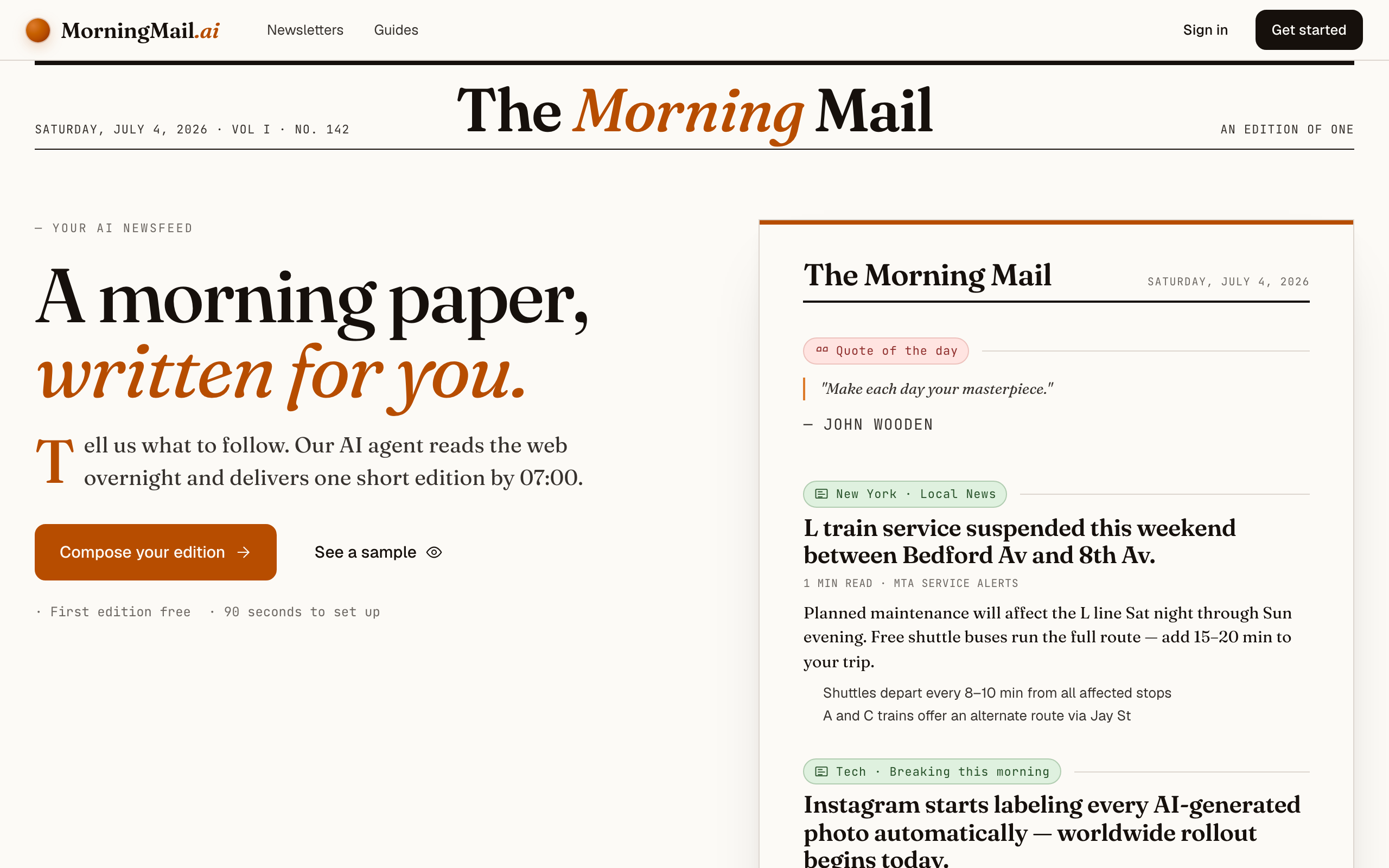
Step 1 Open morningmail.ai
Head over to morningmail.ai. You'll see a sample edition and the Compose button — that's your entry point. Nothing to install; everything runs in the browser.
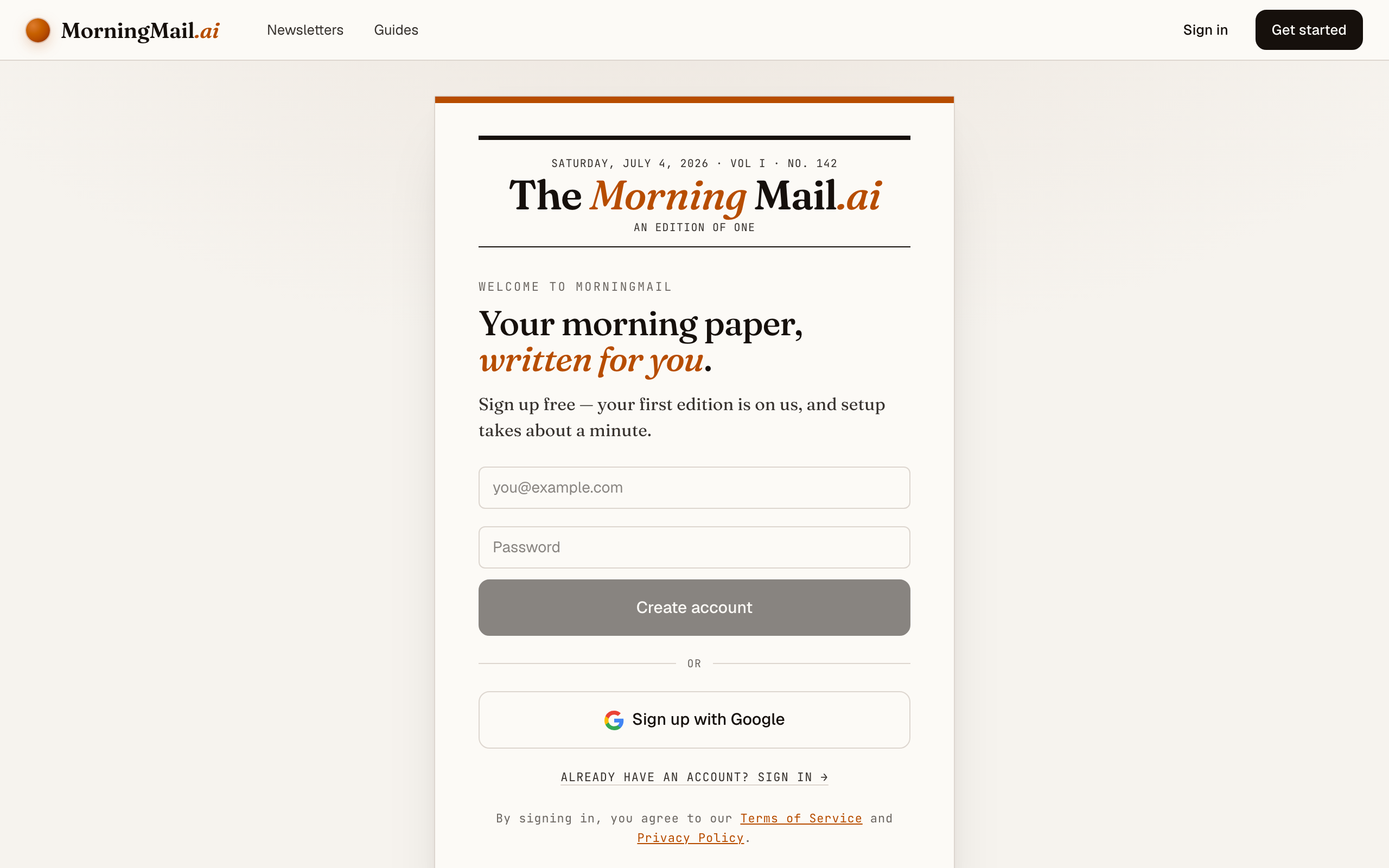
Step 2 Create your free account
Sign up with your Google account. Every new account comes with a free first edition built in — so you can send yourself a real email before paying a cent.
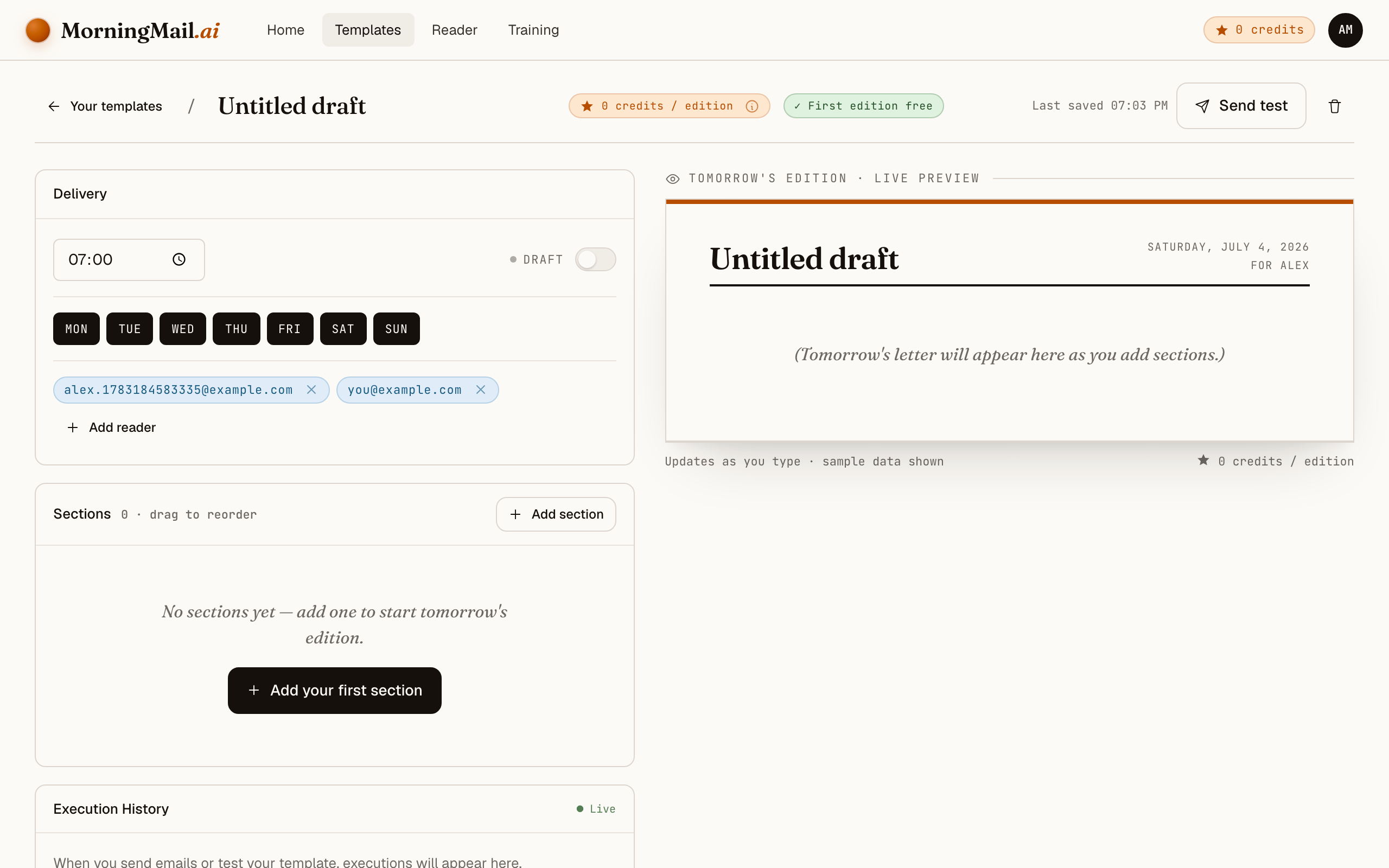
Step 3 Create your first template
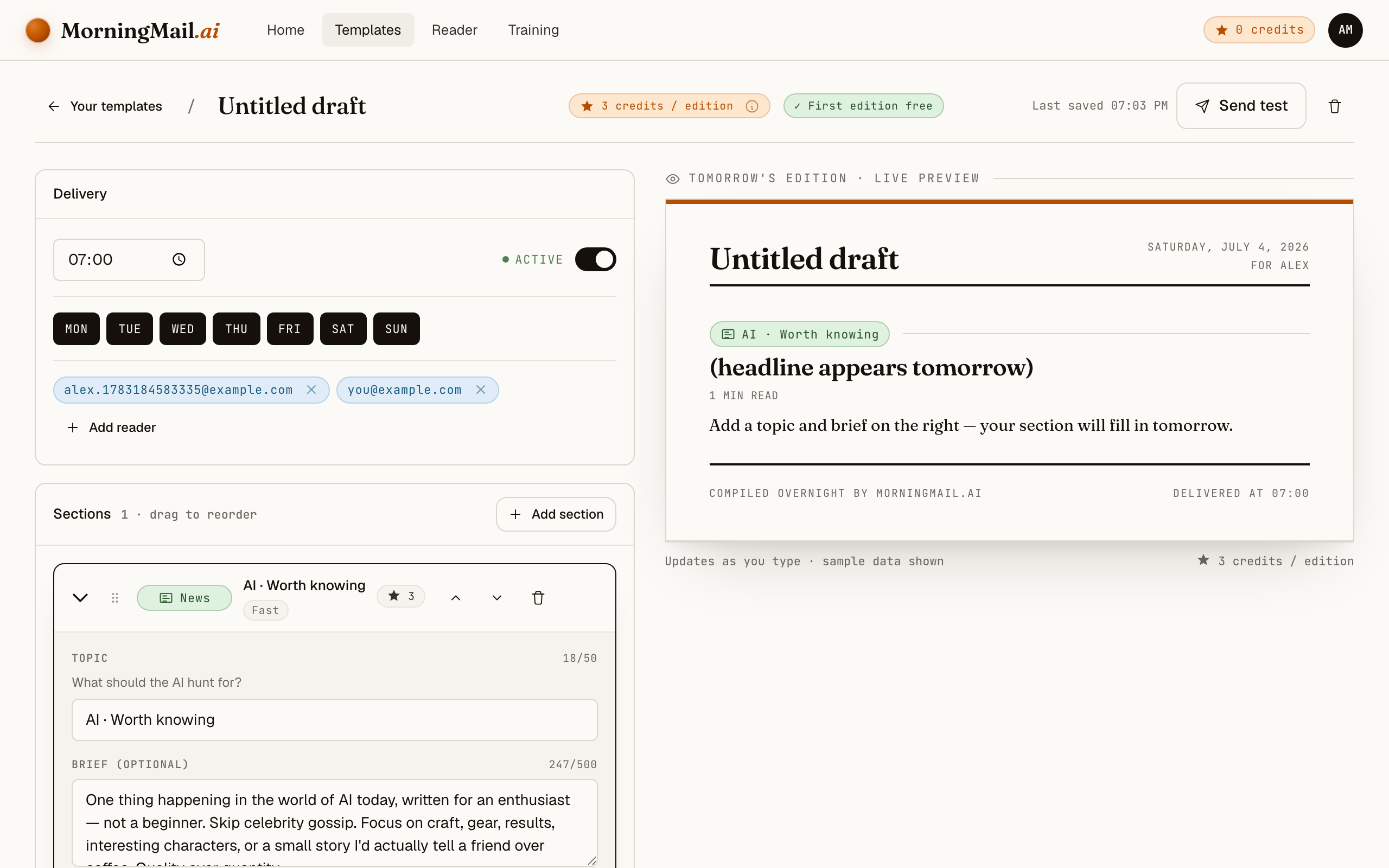
A template is the blueprint of your email: name, delivery time, recipients, and your content sections. Click "New template" and the builder opens with a live preview right next to the editor. Everything saves automatically — there is no save button to forget.
Step 4 Add a news section
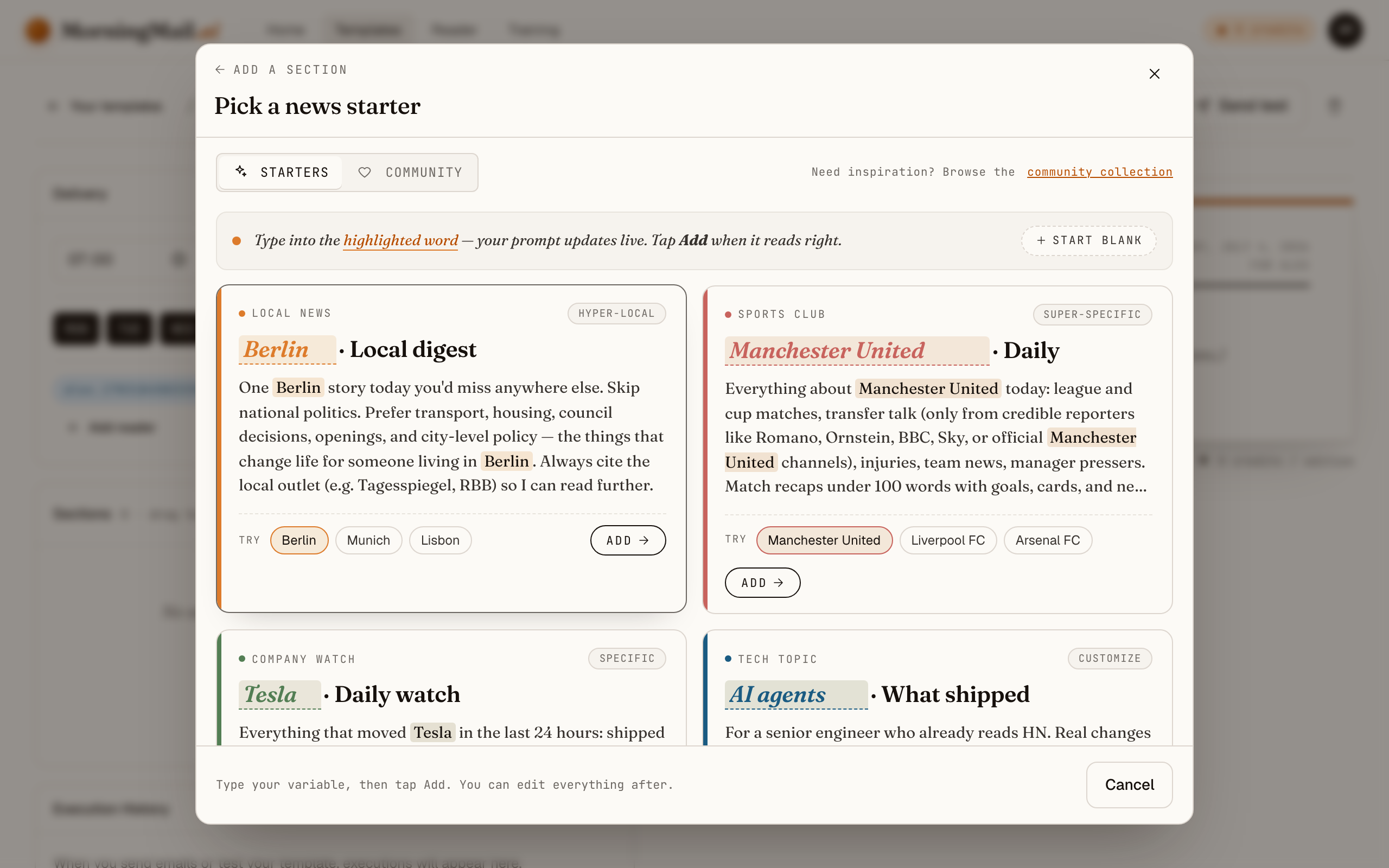
Click "Add section +" and pick "News topic". You'll see six starters — real, editable prompts for a city, a sports club, a company, a tech topic, a professional field, and a personal interest. Pick one, and you're thirty seconds away from a working brief.
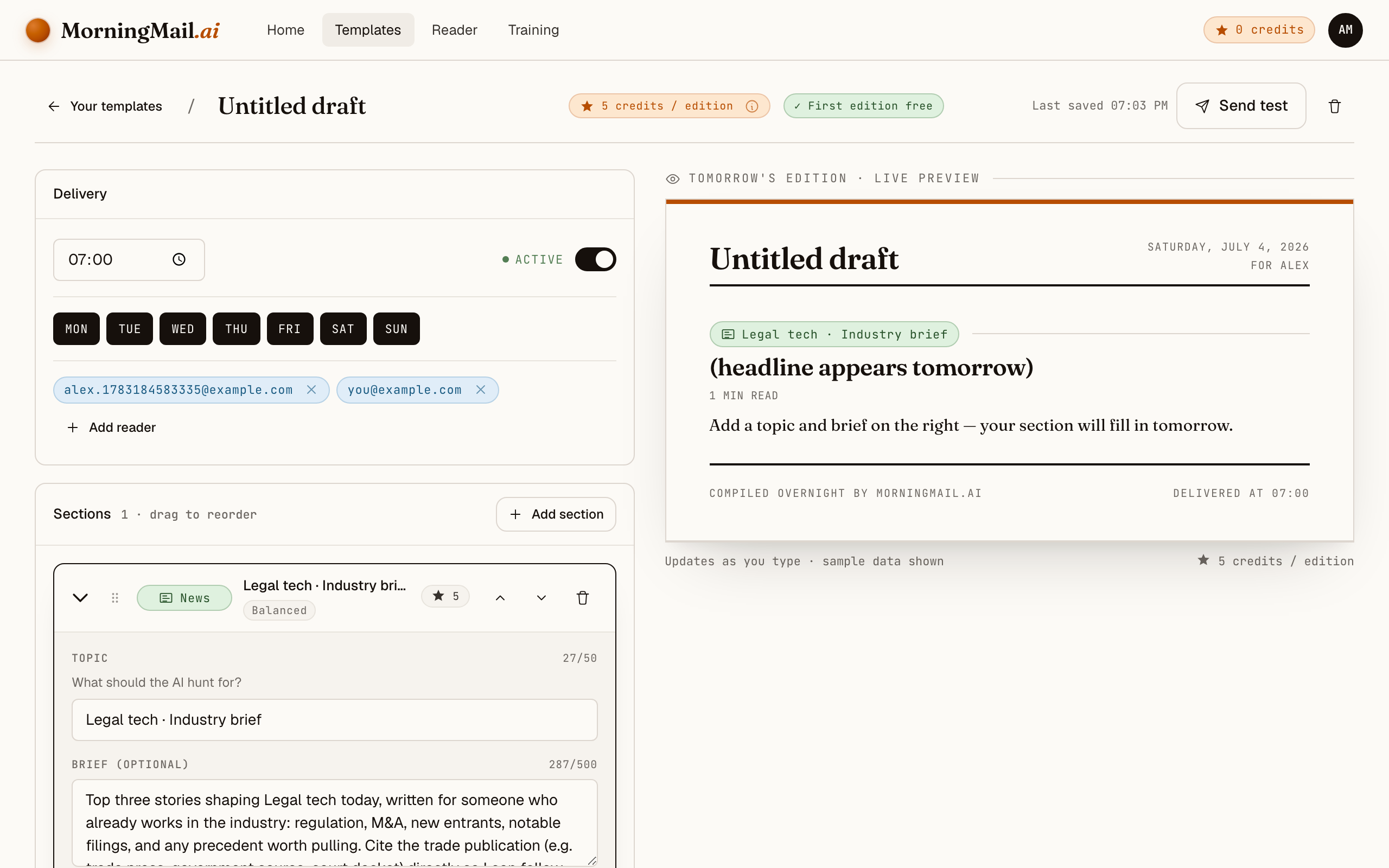
Step 5 Make it yours: Legal tech
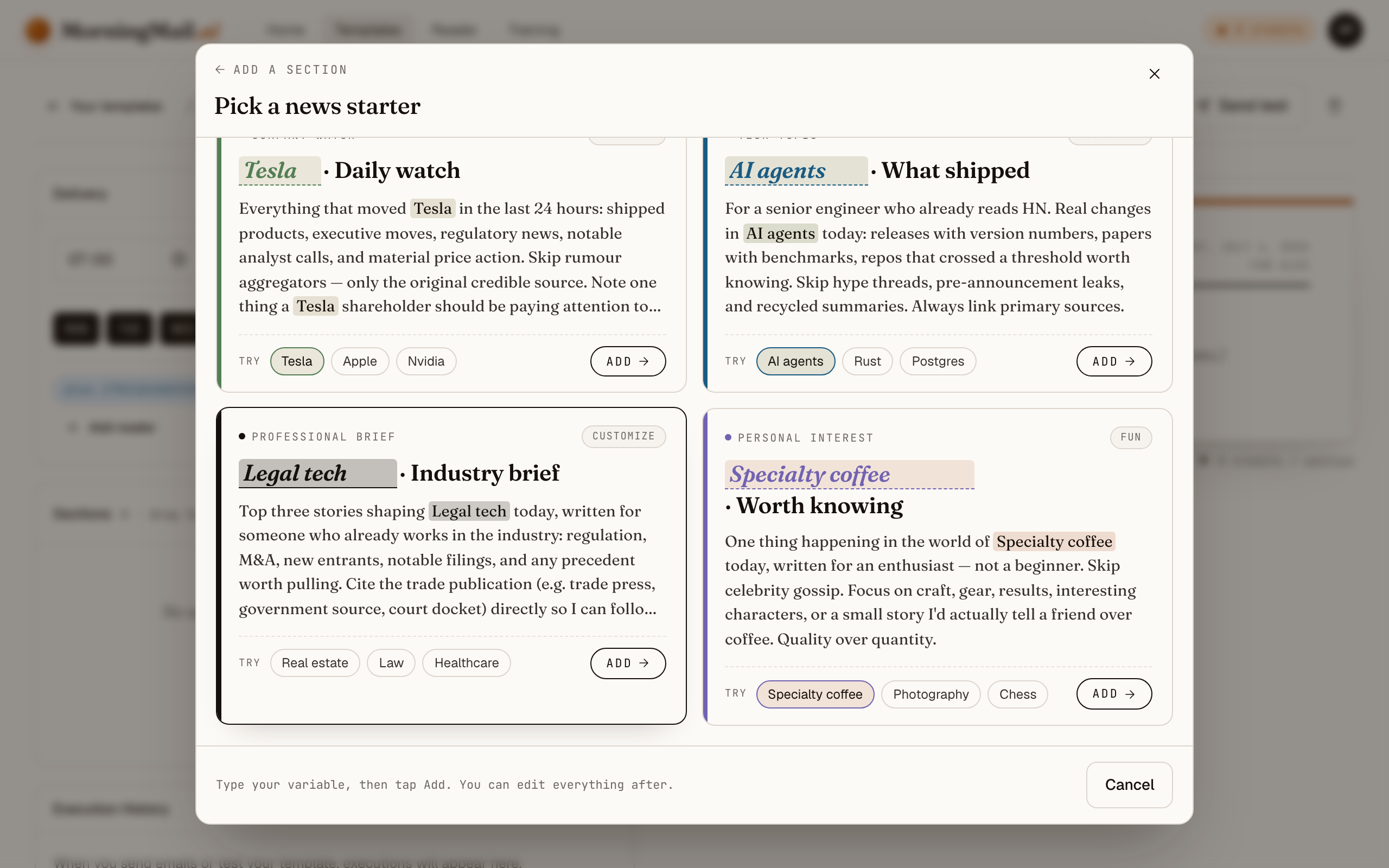
In the module picker, pick the "Professional brief" starter card and type Legal tech into the highlighted field. The card rewrites its prompt live around what you typed — you inspect the exact instruction your agent will follow each morning, before it ever runs.
The starter already demands the top three stories for an industry insider, weighted toward regulation and notable filings, with direct citations. For a lawyer that skeleton is nearly right — sharpen it with your practice, for example: "Prioritise court decisions and bar-association guidance on AI use in practice. I run e-discovery for a mid-size litigation firm; flag rulings on AI-generated evidence and anything touching client-confidentiality duties."
 The exact prompt your section starts with
Top three stories shaping Legal tech today, written for someone who already works in the industry: regulation, M&A, new entrants, notable filings, and any precedent worth pulling. Cite the trade publication (e.g. trade press, government source, court docket) directly so I can follow up.
Step 6 Set your delivery time and send yourself a test
Almost there! Choose when the email should arrive and add your address as a recipient. Hit "Send test" — your first edition is free — and check your inbox. If something reads off, tweak the prompt and send again. Then flip the template to Active. Congratulations — you've just built your own morning brief!
Get more out of your brief
- State your jurisdiction, or drown in American news
- Legal-tech coverage skews heavily US. One sentence — "I practise in Germany; prioritise European courts, EU regulation and German bar guidance" — reweights the entire brief. The agent researches fresh every morning, so the change applies from the very next edition.
- Separate rulings from releases
- Ask the agent to label each item: court decision, regulatory guidance, or product news. The three demand entirely different responses — one may affect a live matter, one your compliance posture, one merely your tool budget.
- Demand the docket, not the write-up
- The starter prompt already asks for direct citations — keep that discipline when you edit. A brief that links the sanctions order itself saves you from repeating someone else's misreading. That's the exact mistake legal tech is supposed to prevent.
- Consider twice a week instead of daily
- Legal tech moves fast, but not stock-ticker fast. You pick your weekdays freely per template — Tuesday and Friday keeps you current and respects the billable day. Switch to daily during a big matter, back afterwards.
- Add a TLDR section for partners who skim
- If you forward the brief to colleagues, add a TLDR section that compresses everything into three bullets, and set the tone to neutral. Each section has its own length and tone settings — one email, several readers.
Good sources to anchor your brief on
The agent searches the open web every morning and cites where it read things. These are the sources I'd point it at in your prompt:
- Legaltech News (Law.com) — The trade paper of record for legal technology — firm adoption, vendor moves and litigation over legal AI, reported by journalists who know the industry.
- Artificial Lawyer — Focused, opinionated coverage of AI in legal practice with a genuinely international view — one of the few outlets that treats European developments as more than a footnote.
- ABA Journal — The American Bar Association's magazine — where professional-responsibility questions around AI, billing and client confidentiality get their authoritative airing.
- LawSites (Bob Ambrogi) — A veteran journalist's running log of legal-tech launches and shutdowns — reliable early signal on which tools are real, with decades of context on which claims aren't.
- Legal Dive — Coverage aimed at in-house legal departments: legal-ops budgets, contract tooling and compliance workflows — the buyer's-side view law-firm coverage misses.
- EDRM (e-discovery community) — Standards, model protocols and case-law commentary for e-discovery — the reference body courts and vendors point to when TAR and AI review protocols are contested.
Frequently asked questions
- What does the daily brief cost?
- Nothing at first — the first edition is free, no credit card. Ongoing sends run on credits: each section costs a few, priced by the AI model tier it uses, and credits never expire. An irregular reading habit wastes nothing.
- How is this better than a Google Alert for "legal AI"?
- An alert can't tell a sanctions order from a vendor press release — it forwards both and leaves the judging to you. The agent reads the sources first, then writes you a memo: what happened, why it matters, every item linked to its primary document.
- Can I trust an AI-written summary for professional purposes?
- Treat it as triage, not authority — the way you'd treat an associate's morning summary. Every claim links to its primary source, so anything that might touch a live matter is one click from verification before you rely on it.
- Can I limit the brief to my jurisdiction or practice area?
- Yes — the prompt is fully editable, and jurisdiction is exactly the kind of standing instruction it's made for. Write "focus on EU and German developments; I practise employment law" and every subsequent edition is filtered accordingly.
- Does it have to arrive every day?
- No. You choose the delivery time and the weekdays per template — daily, twice a week or Friday-only all work. Many lawyers pick two mornings and add the whole practice group as recipients, so everyone reads the same edition.
Your inbox, your editor
Build your own AI-written brief in two minutes. The first edition is on me — no credit card required.
Build your brief — freeI am always happy to answer questions and I'm open to feedback. Feel free to reach out at any time: marius@morningmail.ai